
Shark Mart Beginner Guide: Your First Three Shifts
A Shark Mart beginner guide for the first three shifts: shelf placement, checkout flow, cleaning priorities, whale washing, and when to touch the basement.
Your first Shark Mart shifts are a test of order, not speed. The store gives you enough money to buy a few shelves and enough customers to punish bad placement. This beginner guide breaks the opening into three priorities: build a store that can be stocked, learn the register before the queue forms, and keep the floor clean enough that no one asks questions.
If you have not started yet, the Shark Mart guide→ explains the full loop. This page assumes you are standing in an empty store with a delivery box and no plan.

Shift one: make the store functional
Do not buy cosmetics. Do not buy a second service counter. Buy shelf capacity and place it where a customer can reach it.
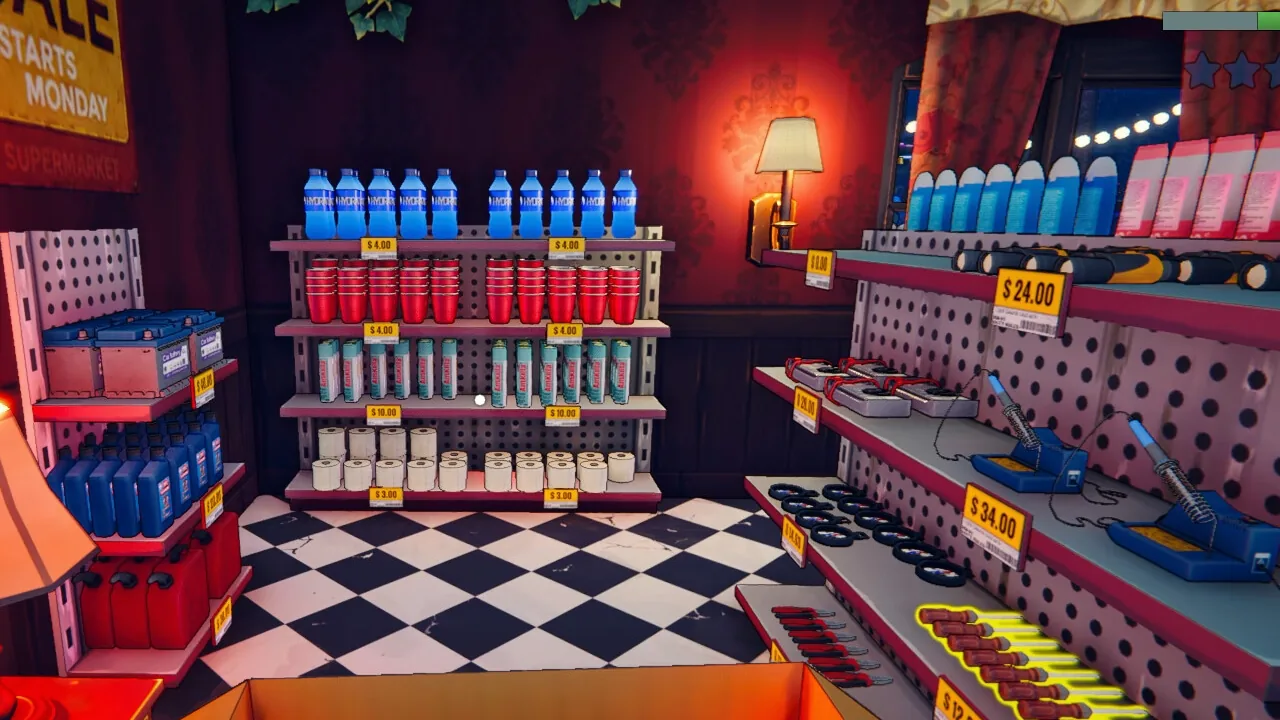
A workable opening layout has three zones:
- Entrance: a low shelf or display that catches customers without blocking the door.
- Aisle: a straight path from the entrance to the register, with shelves on one side.
- Counter: clear space in front of the register for the queue, and clear space behind it for you.
Place shelves with at least one tile of walking room. Rotate them so the product face points into the aisle, not into a wall. If a shelf blocks a customer's path, the sale is lost before it starts.
Buy a shelf, fill it from the delivery box, and break the box down. Repeat until the front of the store looks full. Then open the register and take the first queue. The Shark Mart shelf guide→ covers the difference between small shelves and crate shelves, and why empty boxes should never live in the aisle.
Keep the first shelf close to the register. You want to see stock levels while you scan, not discover an empty shelf after the customer has already walked out.
Shift two: learn the register and the mop
Once the store is stocked, the bottleneck moves to checkout. Ring up each customer, watch the queue, and do not wander off mid-transaction. The register is not a passive station; it is where the store's reputation is decided.
Three habits prevent most early disasters:
- Scan one customer at a time. Do not start a second transaction while the first is unresolved.
- Watch the floor while the queue moves. A spill behind the counter is still a spill.
- Clean before you restock. A dirty store loses star rating faster than a partially empty shelf.
The checkout guide→ explains queue pressure and the manual register in more detail. The short version is that speed matters less than consistency. A cashier who never leaves the counter is worth more than a fast cashier who keeps running to the back room.
Shift three: add one service, not three
By the third shift you should have enough cash for a second revenue stream. Pick one: whale washing, the fishing rod, or the first laundry machine. Do not buy all three.
Whale washing has the clearest payback because it uses the same cleaning instincts as the store floor. A whale arrives with one to four service problems, and each completed service pays separately. Buy the first tool tier, learn the station, and finish the full service before you invest in another platform. The whale wash guide→ lists the tool roles and the upgrade order.
The fishing rod is slower but feeds the basement. The laundry machine removes a recurring mess and adds a wire-repair minigame. Neither is a mistake; both are worse first purchases than a wash station if your store still has empty shelves.
What not to do in the first three shifts
- Do not send a customer to the basement before you understand the police system. The first family job is tempting, and it is also the fastest way to earn a wanted level you cannot clean up.
- Do not buy decorative walls or hats. They do not help the quota, and the early FishBucks are better spent on capacity.
- Do not ignore the star rating. It is displayed in the corner for a reason. A low rating affects how the store is judged and how much pressure you feel at the end of the day.
- Do not play four-player co-op as your first lobby unless someone has played before. Quota scaling makes a disorganized crew busier, not safer.
A simple opening checklist
| Priority | Buy or do | Why |
|---|---|---|
| 1 | One shelf near the entrance | Starts sales with minimal walking |
| 2 | Stock from delivery boxes | Empty shelves do not earn |
| 3 | Open the register | Converts stock into FishBucks |
| 4 | Clean the floor | Protects the star rating |
| 5 | One whale-wash tool | Adds a second income stream |
| 6 | Trash bags or can | Removes evidence and clutter |
Run this checklist at the start of every shift until it becomes automatic. The order changes once you have staff and automation, but the logic does not: capacity first, conversion second, cleanliness third, risk last.
When to bring in a second player
Invite a friend when you can keep the store stable alone. A second player is most useful as a runner or cleaner, not as a second cashier. Two cashiers standing at one register do not double throughput; one cashier and one stocker do.
The Shark Mart co-op guide→ explains the quota jump and the role split for two, three, and four players. Start with two, confirm the connection works, then scale.
FAQ
How much money should I keep at the start of Shark Mart?
Keep enough for one restock and one cleaning tool. Spending everything on shelves leaves you unable to refill them, and an empty shelf is worse than a small one.
Should I buy the fishing rod or the whale wash first?
Buy the whale wash first if your store is clean and staffed. Buy the fishing rod first if you plan to run the basement early and need a reliable fish supply.
Does the star rating reset every day?
The rating reflects the store's recent performance rather than a single transaction. One bad shift will not destroy it, but repeated mess and empty shelves will keep it low.
Official source: Shark Mart on Steam ↗ · Steam news hub ↗ · Steam achievements ↗